



Multi-Factor Authentication (MFA) is often seen as the strongest security layer for Microsoft 365. Many businesses believe that once MFA is enabled, their environment is safe.
The reality is different.
Recent cyberattacks show that attackers are no longer trying to break MFA. Instead, they are finding ways to work around it by abusing identities, tokens, and trusted applications inside Microsoft 365.
This blog explains why MFA alone is not enough, how modern attacks bypass it, and what businesses should do next.
What MFA Protects and What It Does Not
MFA adds an extra verification step during login, such as a mobile prompt or OTP. It works well against basic attacks like:
- Password guessing
- Credential stuffing
- Brute force login attempts
However, most modern Microsoft 365 attacks do not rely on login attempts at all.
Attackers now focus on what happens after authentication.
How Attackers Bypass MFA in Microsoft 365
1. Token Theft Instead of Password Theft
Once a user successfully logs in with MFA, Microsoft 365 issues authentication tokens. These tokens allow access without asking for MFA again for a certain time.
Attackers steal these tokens using:
- Phishing links
- Compromised devices
- Malicious browser extensions
- Session hijacking tools
With a valid token, attackers can access email, SharePoint, OneDrive, and Teams without triggering MFA.
2. OAuth App Abuse
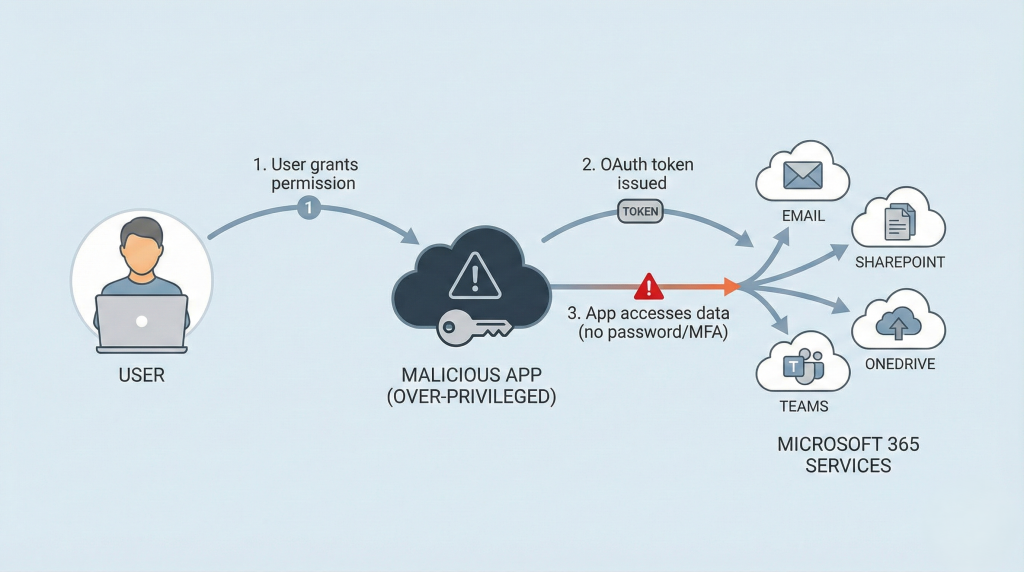
Microsoft 365 allows third-party and internal apps to access data using OAuth permissions.
Attackers:
- Trick users into approving malicious apps
- Abuse over-privileged applications
- Reuse old or unused app permissions
Once approved, these apps can read emails, download files, and access calendars without passwords or MFA.
This is one of the fastest-growing attack methods in cloud environments.
3. MFA Fatigue Attacks
In MFA fatigue attacks, users receive repeated MFA push notifications.
Eventually, users:
- Click “Approve” by mistake
- Approve to stop the alerts
- Approve thinking it’s a system issue
Once approved, attackers gain access using legitimate login sessions.
4. Compromised Admin Accounts
If attackers gain access to:
- Global Admin
- Exchange Admin
- Application Admin roles
They can:
- Disable security alerts
- Create hidden inbox rules
- Add new trusted apps
- Maintain long-term access
MFA does not protect against misuse of already privileged access.
Why Microsoft 365 Is a High-Value Target
Microsoft 365 holds:
- Emails
- Business documents
- Financial data
- Customer information
- Internal communication
Most organizations also use:
- Hybrid environments
- Multiple cloud apps
- External integrations
This makes identity the main attack surface, not just passwords.
What Businesses Should Do Beyond MFA
1. Secure Identity, Not Just Login
Focus on:
- Identity governance
- Privileged access control
- Token and session monitoring
2. Use Conditional Access Properly
Apply rules based on:
- Location
- Device compliance
- Risk level
- User role
Avoid “MFA for everyone, everywhere” without logic.
3. Monitor Token and App Activity
- Review OAuth apps regularly
- Remove unused or risky permissions
- Monitor unusual token usage
- Track abnormal sign-ins and access patterns
4. Enable Privileged Identity Management (PIM)
PIM ensures:
- No permanent admin access
- Just-in-time role activation
- Approval and audit trails for admin actions
5. Train Users on Modern Threats
Users should understand:
- MFA fatigue risks
- Consent phishing
- Fake app approval requests
- Suspicious login behavior
Security awareness is as important as security tools.
Final Thoughts
MFA is important, but it is not a complete security strategy.
Modern Microsoft 365 attacks focus on:
- Tokens
- OAuth permissions
- Trusted identities
- Legitimate access paths
To stay secure, organizations must move from password protection to identity protection.
If your Microsoft 365 security strategy still depends only on MFA, it’s time to upgrade.


