

 Compromised credentials drive 19% of breaches according to IBM’s 2023 Cost of a Data Breach Report . Azure security has become increasingly critical as cloud threats evolve faster than ever in 2025, with attack surfaces expanding across hybrid and multi-cloud environments. When organizations operate across multiple cloud platforms, the security challenges multiply exponentially.
As the market for cloud computing grows, so does the need for enhanced cloud security measures . We’ve seen firsthand how azure security center provides unified visibility across diverse cloud environments, while azure cloud security practices help organizations navigate the shared responsibility model. Microsoft Azure handles critical resources and applications on the platform , however, additional azure security tools are essential to enhance native capabilities and provide proactive protection against emerging threats. With Gartner forecasting that investments in cloud security will surpass all other segments in the security market , implementing robust azure security services and azure security best practices has never been more important.
In this expert guide, we’ll explore why your multi-cloud strategy needs Azure security and how to leverage it effectively across your entire cloud ecosystem.
Understanding Multi-Cloud Environments and Security Challenges
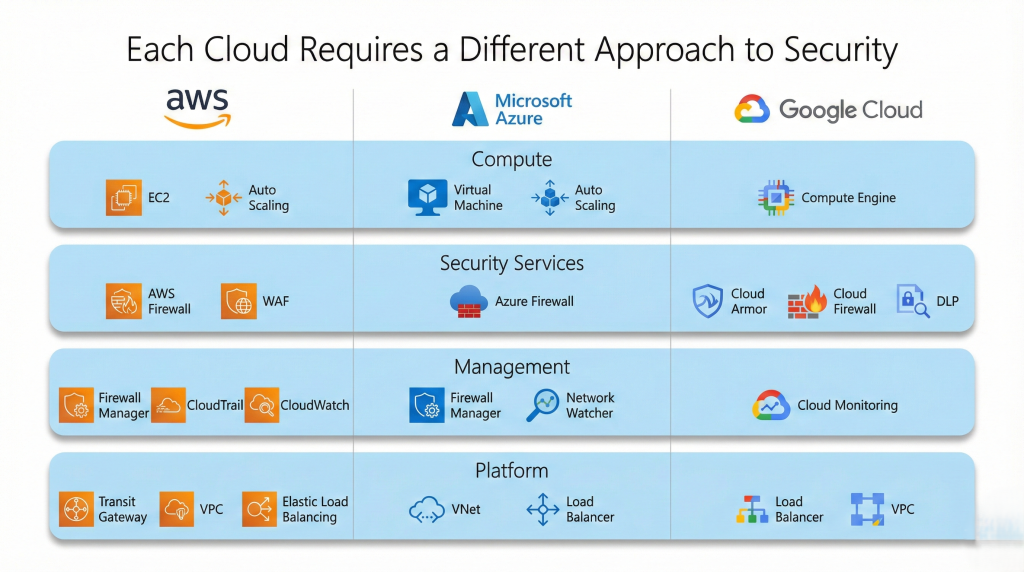
Multi-cloud environments expand rapidly across organizations, introducing significant security complexities. In fact, 80% of enterprises have already adopted a multi-cloud security strategy, yet these organizations face an average of 59 multi-cloud data security incidents annually . Understanding these environments and their unique challenges is essential before implementing effective protection strategies.
What Makes Multi-Cloud Different from Single Cloud
Multi-cloud refers to using computing and storage services from multiple providers simultaneously within a single architecture. This approach distributes workloads between different clouds to optimize efficiency and costs. Unlike a single cloud strategy, multi-cloud gives businesses flexibility to select specific services based on each provider’s strengths, avoiding dependency on one vendor.
Nevertheless, this approach comes with trade-offs. Multi-cloud environments often simplify to the “least common denominator” since workloads must be designed not to rely on unique value-added services from specific providers . This prevents organizations from fully leveraging advanced azure security services offered by individual platforms.
Additionally, operating across multiple clouds requires broader technical expertise. Many organizations have just recently implemented training initiatives for a single cloud provider. This technical complexity extends to orchestration and security management, requiring a specialized layer of azure security tools that can work across environments.
Common Security Gaps in Multi-Cloud Deployments
Configuration management represents one of the most persistent challenges in multi-cloud environments. Each provider has unique settings and security models, making misconfigurations common due to human errors, misunderstanding of responsibilities, and constant service updates. Organizations with multi-cloud deployments have an average of 351 exploitable attack paths, primarily stemming from internet exposure and insecure credentials.
Visibility presents another significant challenge. Without centralized monitoring, threats can go undetected as security teams struggle to track data movement across disparate environments. Each cloud provider offers its own management console but none provide comprehensive cross-cloud visibility, hampering effective azure cloud security practices.
The attack surface expands considerably with each additional provider. Using multiple clouds means more potential entry points for attackers, especially concerning API connections between services. Furthermore, compliance becomes increasingly complex as data may reside in different geographical locations subject to varying regulations such as GDPR, HIPAA, or PCI DSS.
The Shared Responsibility Model Across Multiple Clouds
The shared responsibility model delineates security duties between cloud providers and customers. Yet this model varies between AWS, Azure, and Google Cloud, creating confusion for organizations operating in multiple environments.
For infrastructure (IaaS), customers typically manage operating system security, applications, and data protection, while providers handle physical infrastructure security. With platform services (PaaS), the division shifts—providers manage more of the stack including operating systems, but customers remain responsible for data and application security.
Across all cloud models, customers always retain responsibility for:
- Data classification, protection, and governance
- Identity and access management
- Client endpoints and devices accessing cloud services
- Application security configuration and code security
Understanding these varied responsibility models becomes particularly critical in multi-cloud environments. Azure security center helps organizations implement consistent security controls across multiple clouds through unified management and visibility, simplifying this complex landscape.
Why Azure Security Center is Essential for Multi-Cloud Strategy
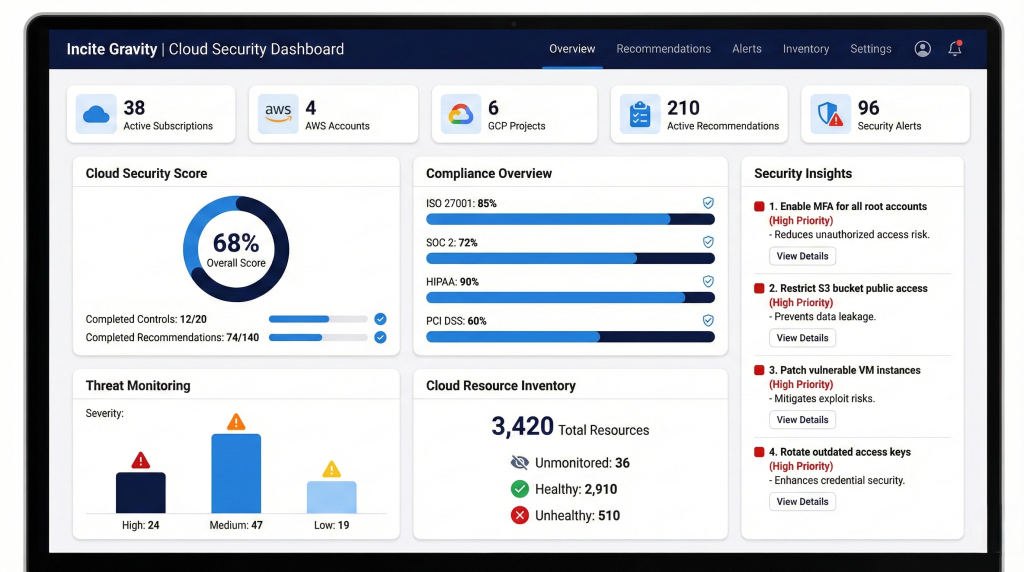
Managing security across multiple cloud environments presents significant operational challenges for organizations. Microsoft Defender for Cloud (formerly Azure Security Center) addresses these complexities by providing essential capabilities that streamline multi-cloud security management and enhance overall protection.
Unified Visibility Across AWS, GCP, and Azure
The lack of comprehensive visibility across cloud environments creates substantial blind spots that attackers can exploit. Microsoft Defender for Cloud resolves this challenge by connecting AWS, Azure, and GCP accounts to create a unified multi-cloud view of your security posture. This integration enables security teams to monitor all cloud environments from a single console rather than juggling multiple dashboards.
Notably, Microsoft Sentinel supports this unified approach by enabling cross-platform correlation when bringing AWS logs into the platform. For instance, it can correlate an AWS CloudTrail event (like a new IAM user creation) with a Microsoft Entra ID log (the same user signing in from a suspicious IP) and a Microsoft 365 event (that user downloading sensitive files). This comprehensive view proves invaluable for detecting sophisticated attacks that span multiple environments.
Moreover, the dashboard provides multi-cloud asset inventory, compliance status across multiple frameworks (CIS, NIST, ISO 27001), and security score trending to compare metrics across all cloud environments. These capabilities enable organizations to detect security threats in real-time that might otherwise remain hidden in isolated management systems.
Centralized Policy Management and Compliance
Implementing consistent security policies across diverse cloud environments traditionally required managing multiple tools with different interfaces. Azure Security Center eliminates this challenge through centralized policy management that creates uniform security controls across all platforms.
The Azure Security Benchmark now serves as the default security policy for Azure Security Center, reflecting a broader set of recommendations that span multiple cloud resources. This integration ensures that organizations can consistently enforce security policies and compliance requirements regardless of where workloads reside.
Consequently, organizations can streamline regulatory compliance efforts by centralizing policies that align with industry regulations. The full control set layout of the Azure Security Benchmark in the compliance dashboard is available to all customers, allowing teams to view compliance relative to benchmark controls while assessing impact on their Secure Score. This unified approach to compliance management significantly reduces administrative overhead and ensures consistent security standards.
Cost Benefits of Consolidated Security Tools
Maintaining separate security tools for each cloud platform not only increases complexity but also drives up operational expenses. Consolidating multi-cloud security through Azure Security Center delivers substantial cost advantages.
Primarily, organizations benefit from reduced administrative overhead as security teams can manage protection across environments from a single interface. This consolidation eliminates the need to train staff on multiple vendor-specific security tools, thus decreasing training costs and improving operational efficiency.
Additionally, Microsoft Defender for Cloud provides foundational multi-cloud Cloud Security Posture Management (CSPM) capabilities at no additional cost, offering immediate financial benefits while improving security. Through automated guardrails for encryption, access management, and compliance reporting, organizations can:
- Reduce manual security monitoring efforts
- Lower the risk of costly security breaches
- Decrease time spent on compliance reporting
- Improve resource allocation through unified visibility
Ultimately, consolidating security tools through Azure Security Center enables organizations to optimize their security investments while ensuring comprehensive protection across their entire multi-cloud infrastructure.
Core Azure Security Services for Multi-Cloud Protection
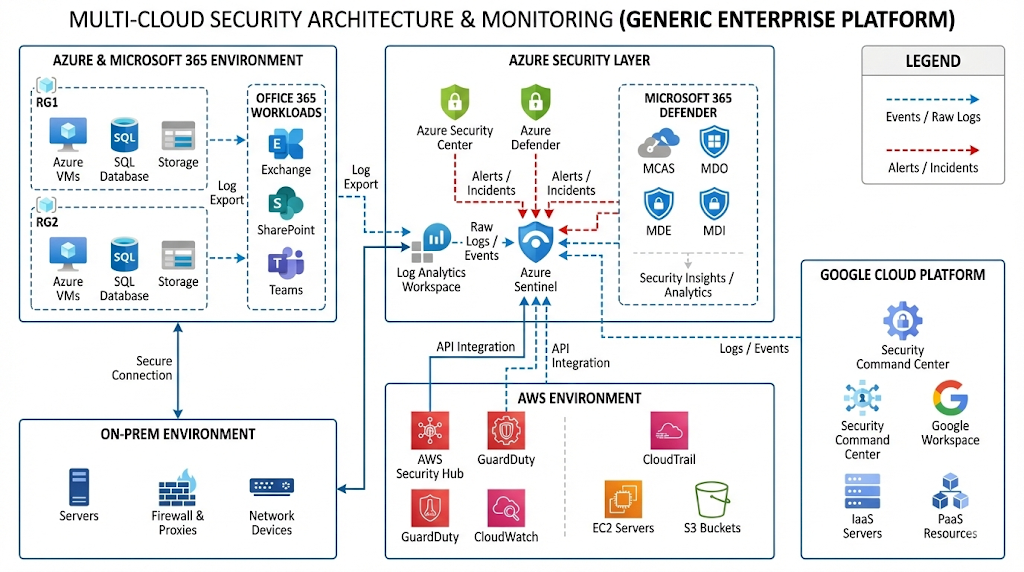
Microsoft offers a powerful suite of security services specifically designed for protecting resources across multiple cloud platforms. These tools help organizations maintain consistent security controls regardless of where their workloads run.
Microsoft Defender for Cloud Multi-Cloud Capabilities
Microsoft Defender for Cloud provides comprehensive protection across Azure, AWS, and Google Cloud environments through its Cloud Native Application Protection Platform (CNAPP) capabilities. This solution delivers native Cloud Security Posture Management (CSPM) coupled with threat protection across all major cloud platforms. Organizations can onboard AWS and GCP accounts to get a unified multi-cloud view of their security posture, with misconfigurations and findings from AWS Security Hub and GCP Security Command Center included in the Secure Score Model. Defender for Cloud uses machine learning and behavioral analytics to continuously monitor cloud resources for anomalous activities, detecting potential threats in real-time.
Azure Sentinel for Cross-Cloud Threat Detection
Azure Sentinel serves as a cloud-native Security Information and Event Management (SIEM) and Security Orchestration, Automation, and Response (SOAR) platform designed for multi-cloud environments. It ingests data from Azure, AWS, GCP, Microsoft 365, and on-premises systems . Through built-in machine learning algorithms and analytics rules, Azure Sentinel provides real-time threat detection across all connected environments. The platform includes data connectors for AWS CloudTrail, Google Cloud Audit Logs, and Azure Activity Logs, allowing seamless data ingestion into a unified workspace. This cross-platform correlation enables security teams to detect sophisticated attacks that span multiple clouds.
Azure Arc for Hybrid and Multi-Cloud Management
Azure Arc extends the Azure platform to help organizations build applications and services that run across datacenters, edge locations, and multi-cloud environments. It projects existing on-premises, edge, and multi-cloud resources into Azure Resource Manager, providing a centralized control plane. Azure Arc works with any Kubernetes clusters certified by the Cloud Native Computing Foundation, including those running on GCP or AWS. It simplifies governance by delivering consistent management across environments, allowing organizations to implement security policies and automate tasks as if all resources were running in Azure.
Identity Protection with Microsoft Entra ID
Microsoft Entra ID Protection helps detect, investigate, and remediate identity-based risks across cloud platforms. The service analyzes 78 trillion security signals daily to identify suspicious activities like anonymous IP address usage, password spray attacks, and leaked credentials. Microsoft Entra extends protection to other major cloud platforms, including AWS and Google Cloud. Organizations can implement risk-based adaptive access policies that enable automated, real-time response for applications and identities across all cloud environments.
Network Security Across Cloud Boundaries
Microsoft Defender for Cloud provides advanced threat detection with continuous monitoring and alerts across network boundaries. It scans for vulnerabilities, helps secure configurations, and uses AI-driven insights to identify potential threats spanning multiple cloud environments. This comprehensive approach enables organizations to detect and respond to malicious network activities quickly, regardless of where they originate.
Azure Security Best Practices for Multi-Cloud Deployments
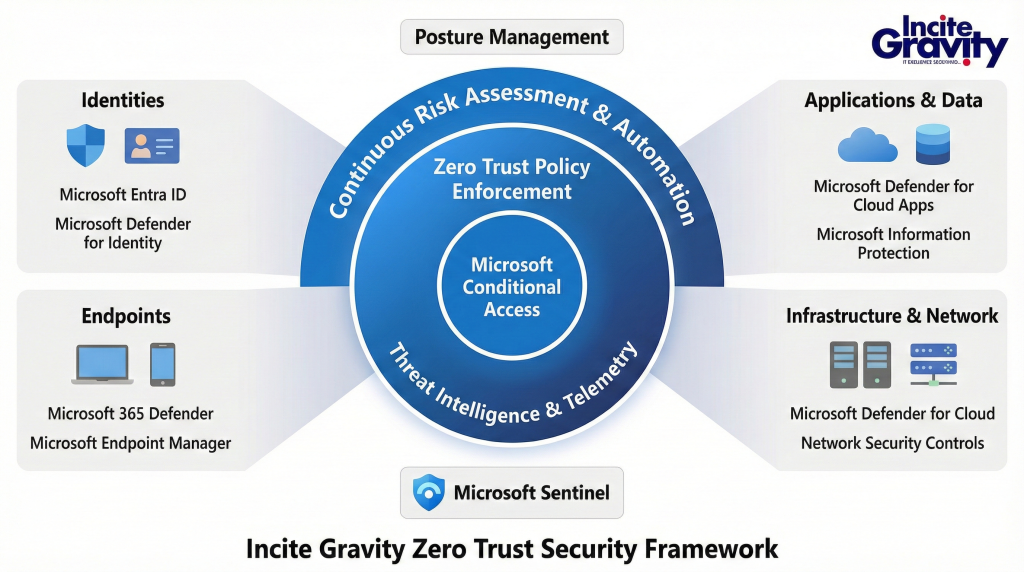
Effective security across multiple cloud platforms requires both robust architecture and operational excellence. Based on industry data, organizations with multi-cloud deployments experience an average of 351 exploitable attack paths, making strategic security implementation crucial.
Implementing Zero Trust Architecture Across Clouds
Zero Trust represents a fundamental shift from traditional “trust but verify” to “never trust, always verify” approaches. To implement this model across multi-cloud environments, start by defining a “protect surface” containing your most critical data, applications, and assets. Then develop explicit verification requirements for all access requests, authenticating users, devices, and application context before granting permissions. Initially establish unified identity management with Single Sign-On and robust multi-factor authentication as your cornerstone. Organizations implementing Zero Trust report 30% already having strategies in place, with an additional 27% planning implementation within six months.
Automating Compliance Monitoring and Reporting
Transform your compliance operations from document-centric to data-centric processes by expressing all security policies, configurations, and measurements as code. This “compliance-as-code” approach enables automated, continuous compliance rather than point-in-time assessments. Essentially, adopt Git repositories as single sources of truth for compliance documentation, enabling effective change management. Implement automated tools that analyze systems for risks, non-compliance, or misconfigurations in real-time. These tools provide detailed, up-to-date compliance reports during audits without time-consuming manual gathering.
Managing Secrets and Keys Across Platforms
Secrets including API keys, database credentials, and certificates must be protected across cloud boundaries. First, eliminate long-lived secrets whenever possible by relying on Cloud IAM roles and Workload Identity Federation. For situations requiring static credentials, use centralized secrets management platforms like Azure Key Vault, AWS Secrets Manager, or HashiCorp Vault. Implement automated rotation strategies including time-based, usage-based, and event-driven approaches. Maintain detailed access logs showing who accessed which secrets and when, setting real-time alerts for suspicious activities.
Setting Up Microsegmentation for Workload Isolation
Microsegmentation creates isolated zones within networks, each with granular security rules. This approach delivers stronger protection by:
- Limiting communication between workloads based on least privilege
- Containing malware outbreaks by automatically blocking lateral movement
- Enforcing identity-based rather than IP-based controls, essential for dynamic cloud environments
- Providing deeper visibility into east-west traffic patterns across clouds
Implement microsegmentation through agent-based solutions on individual workloads, network-based segmentation controls, or native cloud controls like AWS Security Groups. This strategy drastically reduces attack surfaces while improving regulatory compliance through precise traffic control.
Choosing the Right Azure Security Tools for Your Multi-Cloud Setup
Selecting the appropriate security tools for multi-cloud environments requires careful evaluation of several factors. As your organization expands across multiple cloud platforms, your security approach must balance coverage, integration capabilities, and cost considerations.
Native vs Third-Party CNAPP Platforms
When choosing between Microsoft’s native security tools and third-party Cloud-Native Application Protection Platforms (CNAPPs), consider their inherent strengths. Azure’s proprietary tools offer deep integration within the Azure ecosystem, whereas third-party solutions provide broader cross-platform compatibility. Microsoft Defender for Cloud delivers unified cloud-native application protection across multi-cloud environments , yet third-party tools often support a wider variety of application types beyond common container images. Although CSP-built security tools excel in their respective environments, third-party CNAPPs typically offer more extensive vulnerability detection by drawing from larger databases.
Integration Requirements and Compatibility
Above all, ensure your selected tools integrate seamlessly with existing cloud infrastructure. Microsoft Defender for Cloud now includes a preview of unified multi-cloud view incorporating Google Cloud and AWS security alerts. First thing to remember when evaluating compatibility is whether the solution supports all your deployed cloud platforms. Microsoft’s solutions are designed to work harmoniously within their ecosystem, balanced against third-party tools that offer flexibility across multiple platforms. This cross-platform capability reduces vendor lock-in for organizations pursuing multi-cloud strategies.
Pricing Models and Budget Considerations
Microsoft Defender for Cloud provides foundational CSPM capabilities free of charge, with enhanced features available through subscription models. In contrast, many third-party solutions implement resource-based pricing that scales with environment size. Worth noting, you can achieve up to 22% savings with Microsoft Defender for Cloud when pre-purchasing Commit Units. Ultimately, consider total cost of ownership, including operational expenses for deployment, management, and personnel training required for each option.
Conclusion
Multi-cloud environments have become the standard for modern enterprises, yet they bring complex security challenges that demand specialized solutions. Throughout this guide, we’ve explored why Azure security forms a critical foundation for any robust multi-cloud strategy.
Security teams face significant obstacles when protecting resources across disparate cloud platforms. Nevertheless, Microsoft’s comprehensive security portfolio addresses these challenges through unified visibility, centralized management, and cross-platform protection capabilities. Azure Security Center specifically stands out as an essential tool that reduces complexity while enhancing protection across AWS, GCP, and Azure environments.
The implementation of Zero Trust principles, automated compliance monitoring, proper secrets management, and microsegmentation creates multiple layers of protection that work together across cloud boundaries. These practices, when combined with tools like Microsoft Defender for Cloud, Azure Sentinel, and Microsoft Entra ID, provide comprehensive security coverage regardless of where your workloads reside.
Organizations must carefully evaluate their unique requirements when selecting security tools for their multi-cloud environments. Native Azure solutions offer deep integration advantages, though third-party options may provide broader platform support in certain scenarios. Additionally, pricing considerations play a crucial role in determining the most cost-effective approach for your security strategy.
Multi-cloud deployments will continue expanding as businesses seek flexibility, cost optimization, and specialized capabilities from different providers. Azure security serves as the connective tissue that unifies protection across these environments, enabling businesses to innovate confidently while maintaining strong security posture. Rather than treating security as an afterthought, organizations embracing Azure’s multi-cloud security capabilities can transform protection into a strategic advantage that supports business growth and technological transformation.
As multi-cloud environments grow more complex, security can no longer be reactive. It must be strategic, unified, and built for scale.
At Incite Gravity, we help organizations implement Azure-powered multi-cloud security frameworks that strengthen visibility, enforce Zero Trust principles, and reduce operational risk.
If you’re evaluating your cloud security strategy, now is the right time to ensure it’s future-ready.
FAQs
Q1. Why is security crucial in multi-cloud environments? Security is critical in multi-cloud environments due to the complexity of managing different data protection policies across various cloud providers. This makes it challenging to maintain consistent security measures and protect sensitive information effectively across all platforms.
Q2. What are the key benefits of implementing a multi-cloud strategy? A multi-cloud strategy allows businesses to leverage the strengths of different cloud platforms, optimize costs, and enhance resilience. By distributing workloads across various environments, organizations can improve performance and mitigate risks associated with relying on a single cloud provider.
Q3. How does Azure Security Center enhance multi-cloud protection? Azure Security Center provides unified visibility and centralized management across AWS, GCP, and Azure environments. It offers comprehensive threat detection, compliance monitoring, and automated security controls, simplifying the complex task of securing multiple cloud platforms from a single interface.
Q4. What is the Zero Trust approach, and why is it important for multi-cloud security? Zero Trust is a security model based on the principle of “never trust, always verify.” It’s crucial for multi-cloud security as it requires explicit verification for all access requests, regardless of the source. This approach helps prevent unauthorized access and limits the potential impact of breaches across different cloud environments.
Q5. How can organizations effectively manage secrets and keys across multiple cloud platforms? To manage secrets and keys across multiple clouds, organizations should use centralized secrets management platforms like Azure Key Vault or HashiCorp Vault. Implementing automated rotation strategies, eliminating long-lived secrets when possible, and maintaining detailed access logs are essential practices for secure multi-cloud secret management.


